 how-to
Rush Custom Printing Services for Events: 2026 Guide
Table of Contents
- Why Events Have a Hard Deadline (And What That Means for Print)
- How to Prepare Files for Rush Printing
- Rush Screen Printing Turnaround Times Explained
- Last Minute Promotional Products for Events That Ship Fast
- Rush Custom Printing Services for Events: What to Look For
- Eco-Friendly Rush Options and Software Integrations
- Frequently Asked Questions
Last Updated: September 14, 2026
Why Events Have a Hard Deadline (And What That Means for Print)
An event date does not move, and that single fact separates event printing from every other print job. When a conference opens Tuesday morning, the banners, badges, and staff shirts must be in the room that morning.
This guide from Logo Concepts & Printing covers how rush custom printing services for events work, what drives turnaround, and how to avoid mistakes that turn a tight deadline into a missed one. After over 25 years of industry experience, the pattern is consistent: projects fail on file preparation and proofing, not press speed.
Below: how to prepare artwork, which production windows are realistic, and where rush pricing pays off.
How to Prepare Files for Rush Printing
Print-ready files are the biggest factor in whether a rush order ships on time. A print-ready file has correct dimensions, proper bleed, embedded high-resolution graphics, and press-ready colors. Get these right and production starts the hour your order lands.
File Formats, Bleed and Crop Marks, and CMYK Color Mode
Vector artwork is safest for logos and simple graphics because it scales without losing sharpness, supply .ai, .eps, or .pdf where possible. For photos and complex artwork, use high-resolution raster files at 300 DPI at final print size.
Bleed and crop marks tell the printer where to trim. Standard bleed extends artwork beyond the trim line so no white edges appear after cutting. Crop marks sit outside the bleed area and guide the cutting equipment.
CMYK matters for anything printed on paper or fabric. Screens display RGB, presses print CMYK, and the conversion shifts certain colors, especially bright oranges and greens. Convert before submitting, or expect a proof that looks different from your screen.
Common File Errors That Delay a Rush Order
The errors that stall a rush job are predictable and caught in minutes if you know what to check.
- Low-resolution logos pulled from a website instead of the original vector file
- Missing bleed, so background colors stop short of the trim line
- RGB color files submitted for CMYK printing
- Fonts not outlined or embedded, causing text to reflow on the printer's system
- Logo placed too close to a seam, collar, or edge on apparel
- Pantone color referenced but no coated or uncoated specification given
A common mistake is approving a proof on a phone screen. Colors and small text read differently on a monitor than on fabric or paper. Review proofs on a desktop display at full size before you sign off.
Rush Screen Printing Turnaround Times Explained
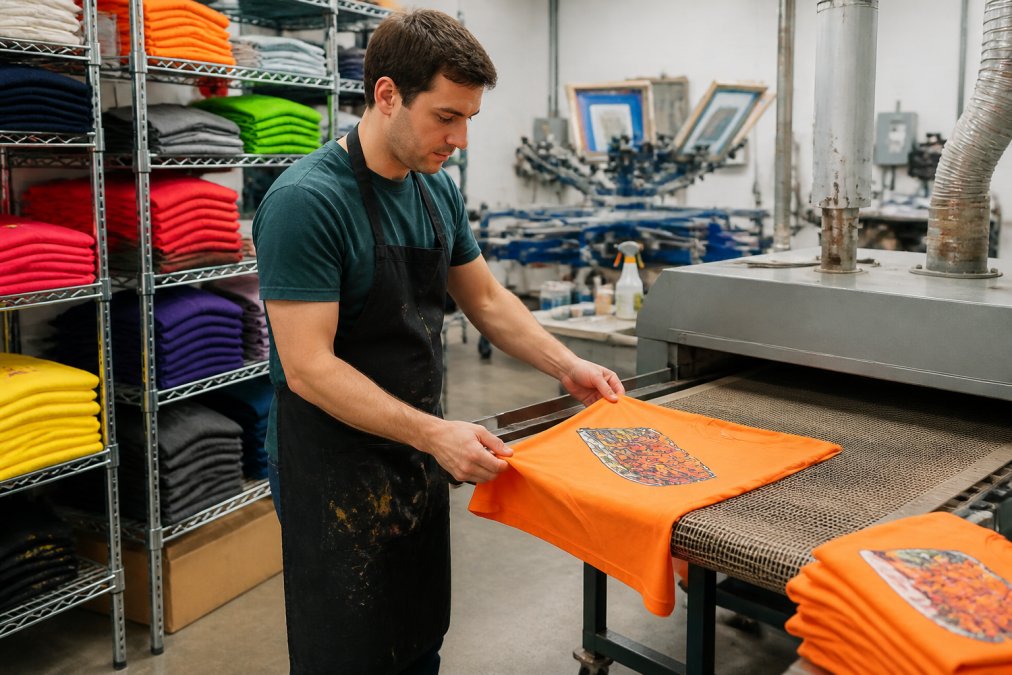
Rush screen printing turnaround times depend on four variables: production window, decoration method, number of colors and print locations, and current shop capacity. Screen printing requires a setup step per color per design, so a one-color logo on 50 shirts moves far faster than a six-color design on the same order. How those variables stack is the difference between a realistic promise and a missed event date.
How the Rush Clock Actually Starts
A rush turnaround does not begin when you email the shop. It begins when three things are true at once: the order is placed and paid, the artwork is confirmed print-ready, and the proof is approved in writing. Any delay pushes the entire schedule, no matter how fast the press runs.
Most shops publish a daily art cutoff, commonly late morning to early afternoon, for same-day production. Miss it and your job rolls to the next business day. Weekends and holidays usually do not count as production days, so a Friday afternoon order for a Monday event may have only one working day behind it.
Same-Day, Next-Day, and 3-Day Production Windows
Same-day production is generally reserved for digital printing and small-format items with no screen setup. Next-day suits simple one or two-color apparel. Three-day windows allow multi-color screen printing, embroidery, and large-format signage. Standard production lowers per-unit cost but assumes one to two weeks or more.
| Production Window | Best For | Typical Constraints |
|---|---|---|
| Same-day | Business cards, flyers, small posters | Digital only, no screen setup, early art cutoff |
| Next-day | One or two-color apparel, banners | Artwork must be print-ready, proof approved same day |
| 3-day | Multi-color screen printing, embroidery | Proof approval required before press time is reserved |
| Standard | Large bulk orders, complex designs | Lowest cost per unit, longest calendar |
The trade-off is straightforward. Shorter windows carry higher setup and labor costs, while standard production lowers your per-unit price. For a full breakdown of how decoration methods differ, the Specialty Graphic Imaging Association's industry resources explain the technical differences between screen printing, digital, and embroidery.
What Actually Slows a Rush Order Down
In practice, the press is rarely the bottleneck. The delays that push rush jobs past deadline tend to be administrative and technical:
- Unapproved proofs. A proof that sits in an inbox for a day removes a day from production. Approve in hours, not days.
- Color count creep. Every added color adds a screen, a setup, and press time. Trimming a six-color design to three can move a job from a 3-day window into a next-day window.
- Print locations. Front-only is fastest. Adding a back, sleeve, or neck label multiplies setups and drying passes.
- Garment availability. A shop can print in a day but cannot print what it does not have in stock. Popular sizes and colors sell out during event season, so confirm inventory before committing to a deadline.
- Quantity jumps. A 50-piece order and a 500-piece order are not the same rush job. Large runs may need to be split across presses or shifts.
A Cost-Benefit View of Rush vs. Standard
Rush pricing reflects real costs: expedited setup, overtime labor, and faster shipping. The question is whether the deadline justifies the premium. Rule of thumb: if the event date is fixed and showing up unbranded costs more than the rush premium, pay for rush. If the event recurs on a predictable calendar, order standard and bank the savings.
| Factor | Rush Order | Standard Order |
|---|---|---|
| Turnaround | Same-day to 3 days | 1-2 weeks or more |
| Cost | Higher per unit | Lower per unit |
| Setup flexibility | Limited design changes | Time to revise artwork |
| Best use case | Fixed event date, late decision | Planned campaigns, bulk orders |
The mistake is treating rush as a default rather than a tool for genuine deadlines. Teams that plan ahead get the same branded result for less and keep rush capacity for the one event that truly cannot slip.
Last Minute Promotional Products for Events That Ship Fast
Last minute promotional products for events fall into two groups: items a shop can decorate in-house within a day, and items that ship blank and fast. Knowing which is which keeps your event branded even when the timeline collapses.
Fast-turnaround decorated items typically include:
- Custom apparel: t-shirts, polos, and hoodies with one or two-color prints
- Banners and banner stands for registration and stage backdrops
- Program booklets and event collateral printed digitally
- Custom invitations and name badges
- Promotional giveaways like pens, lanyards, and tote bags
Longer-lead items include embroidered jackets, complex multi-color apparel, and large trade show displays built to order. If your deadline is inside a week, focus on digitally printed collateral and simple apparel, and save elaborate display pieces for next time.
Rush Custom Printing Services for Events: What to Look For
The right rush printing partner offers more than speed: in-house design support, guaranteed delivery dates, and a proofing process that puts approval in your hands before anything goes to press.
Logo Concepts & Printing handles design, mockups, and production in-house, so we commit to tight windows instead of guessing. Through our iPromoteu affiliation, we can source and decorate almost any product category your event needs.
Rush vs. Standard: A Cost-Benefit Breakdown
Rush pricing reflects real costs: expedited setup, overtime labor, and faster shipping. The question is whether the deadline justifies the premium.
| Factor | Rush Order | Standard Order |
|---|---|---|
| Turnaround | Same-day to 3 days | 1-2 weeks or more |
| Cost | Higher per unit | Lower per unit |
| Setup flexibility | Limited design changes | Time to revise artwork |
| Best use case | Fixed event date, late decision | Planned campaigns, bulk orders |
Rush makes sense when the event date is fixed and missing it costs more than the premium. Standard production makes sense when you can plan ahead and want the lowest cost per unit. The mistake is treating rush as a default rather than a tool for genuine deadlines.
Eco-Friendly Rush Options and Software Integrations
Most rush-printing pages treat speed and sustainability as opposites. They are not. Eco-friendly rush materials and event-software integration are exactly where a well-prepared team can save money, reduce waste, and cut the manual errors that derail large orders.
Eco-Friendly Options That Still Ship on a Rush Timeline
Sustainability and speed are not mutually exclusive, but availability varies by product and quantity. Commonly stocked for fast production:
- Recycled and organic cotton apparel. Ringspun cotton and cotton-poly blends are widely stocked; certified organic cotton is available but often in a narrower color and size range.
- Water-based and plastisol-free inks. Water-based inks cure softer and carry lower chemical load than traditional plastisol, and many shops now run them on standard presses without added setup time (Document Display (PURL) | NSCEP).
- Recycled paper stocks and soy-based inks for program booklets, invitations, and name badges printed digitally.
- Reusable signage. Fabric banners and rigid signs that can be stored and reused across multiple events beat single-use foam board on both cost and waste.
Ask which eco options your printer can turn around inside your window, because not every green material is stocked for fast production. Eco upgrades often add a day or two of lead time for specialty substrates, while apparel and digital print upgrades usually do not.
Cutting Waste Without Cutting Corners
The biggest environmental lever in event printing is not the ink, it is over-ordering. Ordering 20% extra "just in case" produces shirts that end up in a landfill (the EPA). Order to your confirmed attendee count plus a small buffer, and choose designs and colors reusable at the next event rather than dated to a single date.
Connecting Print Orders to Event Management Software
Many event teams now connect print orders to event management platforms, pushing attendee counts, badge data, and order details straight into a print queue and cutting the manual re-entry that causes errors on large orders. If you manage registration through a platform, ask whether your printer can accept a data export directly.
In practice, the workflow looks like this:
- Export attendee data from your registration platform as a CSV or spreadsheet, including name, title, company, and any badge-specific fields.
- Send the export to your printer along with your template file, so variable data, names, titles, table numbers, can be merged automatically.
- Confirm the merge with a proof of a few sample records before the full run, catching field-mapping errors early.
- Sync the print deadline to your event timeline so the order ships to arrive before your setup day, not on it.
For teams running multiple events, this integration is the highest-leverage change you can make. It removes the copy-paste step where most badge and program errors originate, and lets you reorder a proven print package in minutes rather than rebuilding it from scratch.
The two things that most often delay a rush order are unapproved proofs and non-print-ready files. Solve both before you place the order, and almost any reasonable deadline becomes achievable. Add eco-material availability and data-export readiness to that checklist, and you also cut waste and manual errors.
Frequently Asked Questions
What is the typical turnaround time for rush custom printing?
Turnaround depends on the product and production method. Same-day production is realistic for digital items like flyers, business cards, and invitations when files arrive print-ready by early morning. Screen-printed apparel and large format signage usually need 24 to 72 hours because of setup, curing, and drying. Always confirm the cutoff time for your specific deadline, and remember that shipping adds transit days unless you arrange local pickup.
Can I get custom apparel printed in less than 24 hours?
It is possible but rare. A print shop needs time to burn screens, mix ink, run the press, and cure the garment, so most rush screen printing turnaround times land at 24 to 48 hours for small runs. Same-day apparel usually only works if the shop has open capacity, your artwork is already vector, and you accept a limited color count. Ask about the real cutoff, not the advertised one.
What file formats are best for rush printing orders?
Send vector artwork (AI, EPS, PDF) whenever possible, because vector files scale cleanly to any size. For raster images, supply 300 DPI at final print size in CMYK color mode. Include 0.125 inches of bleed and clear crop marks on printed collateral. Flattened, low-resolution, or RGB files are the most common reason a rush order gets pushed back a day while a designer rebuilds the file.
What are the cost differences between standard and rush printing?
Rush work costs more because it jumps the queue, often uses overtime labor, and may require expedited shipping rather than ground freight. The premium varies by product, quantity, and how tight the deadline is, so a 72-hour job costs far less than a same-day job. Pricing depends on quantity, dates, and delivery, so request a written quote that separates production from shipping before you commit.